Friday, January 23, 2015

Whatsapp on your Desktop - How to use it!


WhatsApp is available on your desktop. 


Here are the following steps in which you get it. Your phone needs to stay connected to the internet for web client to work

1. Update WhatsApp to latest version from your respective App stores. You will need to have 2.11.498 version or higher.


2. Open https://web.whatsapp.com in your Google Chrome browser.

3. You will see something like below on your screen.


Note:  You don't need QR code scanner app to scan it. Don't try to do this, it wont work, telling from my exp.

4. But you still need to your phone to access it. Basically the new web client is a mirror of the app. So you need to scan the QR code that’s displayed on the site with the Whatsapp mobile app. 
Then you can chat from the desktop.

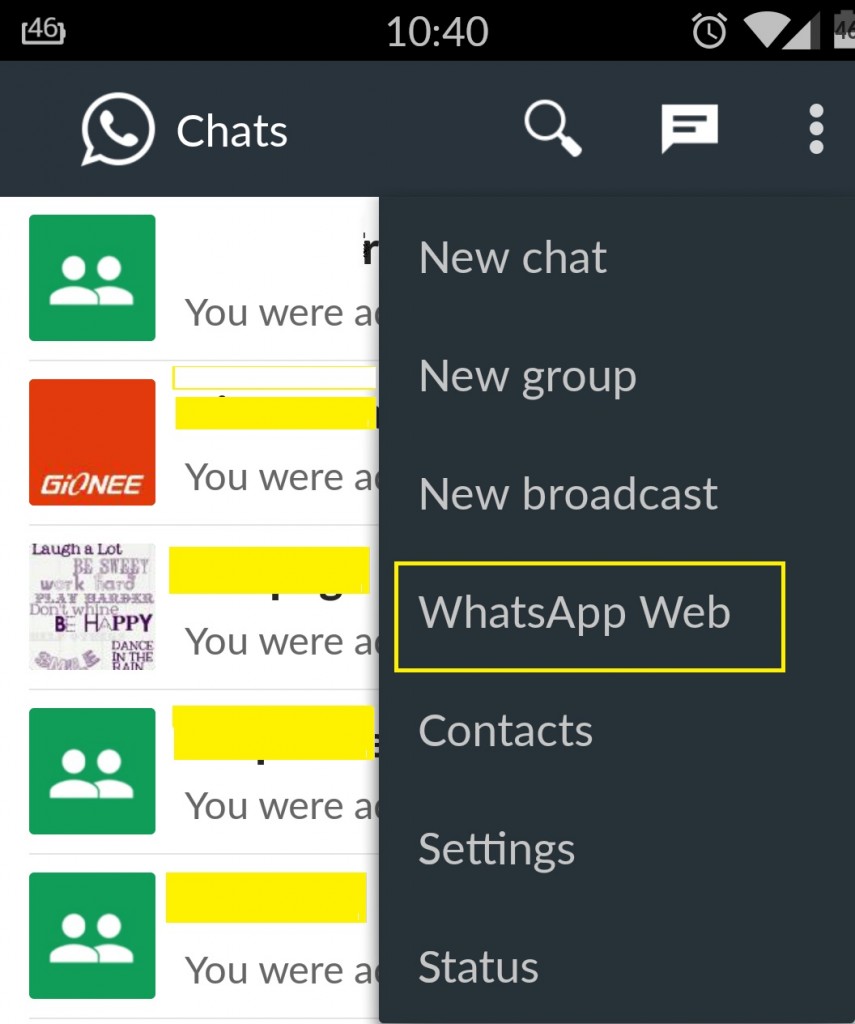
5. Access WhatsApp in your phone and open "Whatsapp Web" option as shown in above screenshot, you will be able to access it based on your mobile OS.


6. It will automatically open your phone camera to scan the QR code shown on web. 

7. VoilĂ  you are logged in to browser. You have now paired WhatsApp on your phone with the WhatsApp web client.

Few Point to Note:
>> Will work only on Google Chrome Browser for only who have Android, Windows Phone or Blackberry version of the Whatsapp. Tough luck for iPhone users. Much like safari, mozilla broswer lovers you also have to wait till iPhone support comes out.  

>> It doesn't support iPhone   

 >> Needs your phone to be on and connected to the internet - After pairing your smartphone with WhatsApp's web client through a QR code image, you'll be able to send and receive messages through your browser. But what if your phone loses the data connection or runs out of charge? WhatsApp web version will also go offline.                                                                                      >> You can't block users     

>> You can't create and leave groups

>> You can't Delete or Forward a Message  or clear conversations.
 ~~~~~~~~~~~~~~~~~~~~~~~~~~~~~~~~~~~~~~~~~~~~~~~~

Thursday, January 15, 2015

Rules of Script Writing by Vijayendra Mohanty


Rule 1 of script-writing.
No one will read what you write. Except the person who brings it to life as animation or a comic book. A script is not prose or fiction. It is a guide or a manual to be followed by others who are working with you.
 --------------------------------------------------------------

Rule 2 of script-writing.
Do not fall in love with the words you are writing down. Before all is said and done, it will undergo the scrutiny of your artist, your editor, your client, and a bunch of other people you would not have considered important. Prepare to be flexible and adapt. Stand up for what you want to stand up for by all means, but by the time your script finds life, it will not resemble your first draft in any way.

  --------------------------------------------------------------

Rule 3 of script-writing.
Nobody cares what your character is thinking. What he is thinking has to show through something he does. A script/screenplay is not a novel. Nobody is going to read it to find out that which does not show. Animation is action (this goes for comic books as well, although to a lesser extent). Things have to show. Movement has to happen. Ditch the long monologues and the mammoth thought bubbles.

--------------------------------------------------------------

Rule 4 of script-writing.
Do not tell your director what music he should play in the background. Moving pictures are his thing, not yours. Your thing is words on paper. Make the mistake of confusing the two and you make everyone's lives difficult.
--------------------------------------------------------------
                     Contact - Vijayendra Mohanty via - Twitter - @Vimoh : Facebook - vimoh

Sunday, January 11, 2015

My Experience of First ever Air Travel #‎FlyTheNewFeeling


#‎FlyTheNewFeeling - My First Flight experience, was when I got my dream job ‬in Infosys in Jan 2007. Had to travel to mysore to join from Delhi. I decided to go to bangalore by flight.

Why So Special
My first flight was more special, becuase I had brought the flight ticket by my own hard earn money. saving from previous call centre job came handly.

First Trouble
My total luggage went up by 20kg from allowed limit, and there I met my saviour, met a long forgotten astro expert friend  (Sudhir Kulkarni) if I can remember correctly at Delhi airport working in one of airlines as ground staff. He helped me clear the luggage thru his connections without paying any extra money.

Most Memorable Part
Flight was early morning at 5.30am, left in night from home, waited whole night at delhi airport in anxity for first flight. Hoever most memorable part of #‎FlyFirstFeeling was the night view from window seat, I saw of delhi, full of fear when flight took off.

Landed around 8am at Bangalore, met many folks heading towards Mysore. I also join the force, to be a so called tech engineer.


Sunday, December 28, 2014

#Digital India take a walk, Railways back to line lagao days


Indian Railways are always an interesting and existing topic, for any age group.  During a normal Facebook scroll I happen to see the link shared by a friend. Curious seeing related to railways I clicked and land on page where Indian Railway have shared information on updated policies related to “Change in the Name of Passenger Holding Confirmed Reservation”.  
You may have shared many times on Facebook this post that "now you can transfer your confirm ticket your relative or friends and they can travel on your behalf". Well Dear not any more, Railways have update their policy. You may want to read again 


For me I have no absolutely no issues with Railways changing / updating its policies related to passenger travel. I have issue in the way they are executing it. Following are points in which I will share my concerns with no hope of Railways Minister or concern officials paying any heed to them.

1  1.  “Chief Reservation Supervisor of important stations are authorized by Railway Administration to permit the change of name of a passenger

-       Please note CRS of ONLY important station are authorized to permit the change, so sir if you happens to be boarding from remote village / small town, you will have to travel to next big/important station to get this change, 24 hours before the departure of train, however you booked the ticked online via IRCTC site.

-       Let me explain this, say you have to board a train from Ashok Nagar (Madhya Pradesh), you fell sick and now your brother need to travel on your place. To get confirm ticket changed on your brother name, you sir please get out of your bed 24 hour before the train leaves from Ashok Nagar and start moving towards station or bus stand to go to either Guna (which I hope may have CRS being a junction suitable enough important station or either go towards BINA a big railway junction in Madhya Pradesh. Find the Chief Reservation Supervisor give in writing that you want it to change the ticket on your brother / relative name, may good luck with you if officer is present on his/her sear to do the needful and does not throw another set of rules / doc / written permission needed to do a simple change.

-      Hope officer does not ask for money, you know “facilitation fees” for doing something which is his/her duty and being paid handsomely by Railway.

-      The policy also does not clarify whether new ticket will be issued or the so called CRS of important station will give written permission/approval seal.  

-       Indian Railways have also not shared the list of important station, so I don’t know out of 8000 odd station which are important station, has a CRS who will do this task.

     2. Where the passenger is a Government Servant , proceeding on duty and appropriate authority, makes a request in writing 24 hours before the scheduled departure of trains

-       So what about private employees, shopkeeper, businessman, where is case rule for them, don’t they pay money for ticket.

      3. “Makes a request in writing 24

-       I have a big big issue here, why request needed to make in writing. Indian Railway going ga-g a day by day on how they are making progress towards #Digital India, you can book ticket, food online, via sms, app, and mobile. Need request in writing. 

-      Why I cannot raise the change request via IRCTC portal by login in to my account.
-      Daily on average about 5lakh tickets are booked online via IRCTC but no sir you have to come to station find the CRS and get change request completed, and 24 hour before your train leaves.

      4. Where the passengers are students of a recognized educational institution and the Head of the institution makes a request in writing 48 hours before the scheduled departure of the train.

-      Seriously, dear policy makers I hope you have you also attended school. Do you really expect head of school, college, and institute will make a request in writing. Do you really thing they pay any heed to this.

Out of 5 lakh daily online tickets booked (not taking consideration of window hardcopy tickets booked), I guess hardly 5 or 10 people may or may not need to use this service of transfer the ticket to his her relative. But even for them why make the service miserable to use. We all know how difficult even today is to book or buy tickets at railways counter. We also don’t need to explain the relation between bribing and Indian railways. We all know what happen to rail minister in UPA government. There is DigitalRail group on MyGovIndia a people participation platform launch by PM Modi to listen ideas. Why have this group when you don’t listen to them.


When everything can happen online, why are you making additional roadblock? Why you need to place a person to do additional task, a function which can happen online via already existing system. When I can book / cancel my ticket online, why I cannot transfer it to my relative online, of-course it can be approved online by a person. This will save my trouble of writing letters, running to station. Why Railways is making a loophole for employees’ officers to earn bribe?


Dear Rail Minister Ji, my humble request to please read @RailMinIndia twitter mentions, and suggestions made at DigitalRail group on MyGovIndia. There are some brilliant ideas shared by common people who actually travel by Train. Who knows what it is line standing in queue at 5am in morning to book a tatkal ticket? Who knows how it is to be like traveling with family to native place during holiday / festive season? 

Wednesday, November 26, 2014

How To Create an RSS Feed For YouTube Channel


How To Create an RSS Feed Your YouTube Channel

Method - 1

If you would like to create an RSS feed for your YouTube channel into an RSS feed, its pretty striaght forward.  just take the following URL:
http://gdata.youtube.com/feeds/api/users/yourchannelname/uploads
and replace the”yourchannelname” with your YouTube channel name and you are all set!
-----------------------------------------------------------------------------------

Method - 2 

Alternatively you can also generate one using below url 
http://anthonyhayes.me/free-seo-tools/youtube-rss-feed-tool/ 
----------------------------------------------------------------------------------- 

Method - 3

Another way of getting feed of videos is using this way
https://www.youtube.com/user/ChannelName/feed


Monday, November 24, 2014

How to delete all email inside Gmail folder

You must have a label or folder that many emals automatically go to.

It now has over 1,000 emails in it. you don't need them.

Is there an easy way to delete them?   - Yes just follow below instructions

1 - Go inside the label or folder from which you want to delete all emails


2. select all read/unread mail using select drop down box.


3. Click the top check box (next to the 'Remove Label' button).  This should populate all check boxes on that page. 


4. Look immediately above the top email in the list.  You should see a line stating "All xxx conversations on this page are selected.  Select all yyy conversations in 'label name'.  


5. If you click on the 'Select all yyy...' portion of this statement, the line should change to 'All yyy conversations in 'label name' are selected'.  


6. At this point, clicking the Delete button will move all conversations from this label into Trash.

 
NOTE: Deleting an email that is in a label will also delete it from any other labels it is in, including Inbox and All Mail.

Cheers